Archives for July 2013

Leaders Read

Leaders Read

One thing that I noticed at my company, all the leaders of the company read.  I’d heard the saying that “leaders read” before but as I looked around, I noticed that Randy and Steve (our directors) as well as all the COOs and Vice Presidents are all readers.  They read business books and also read for pleasure.  It’s a pretty common discussion at the COO dinners to talk about the books you are reading or to talk about a concept you read in a book and how it applies to a situation.

I’ve always been a pretty avid reader, but lately I’ve been much more intentional about it.  One of the best and easiest ways to improve myself is to read.  I always purchased physical books but when I decided to start reading daily, I needed a different approach.  I work out each morning and will either walk on the treadmill or take a walk in my neighborhood.  I decided to combine my walks with my reading.  When I’m on the treadmill, I will read on my Kindle.  When I’m outside I can listen to an audio book.  Using this combination as well as just reading in my spare time I’ve been able to greatly increase the number of books per year.  I’m averaging about 30 right now.

A couple of Jim Rohne quotes I love:  “Work harder on yourself than you do on your job” and “Formal education will make you a living, self education will make you a fortune”.

If you are looking for ideas of where to start, here are some of my favorite books.

Self Development:

compoundeffectThe Compound Effect – Darren Hardy  – This book literally changed my life.  Really gets you thinking about how the little changes you make today add up to huge changes over time.


7habits7 Habits of Highly Successful People – Steven Covey – A classic book on improving yourself and the way you interact with others.


Lean and Manufacturing:

thegoalThe Goal – Eliyahu Goldratt – The seminal book that introduced the theory of constraints.  Great introduction to flow and pull in manufacturing and ties in well with the lean concepts.  Told in a business novel style that makes it an easy and fun read.


thetoyotawayThe Toyota Way – Jeffry Liker – A great introduction to the tools of lean.  Covers all the concepts and gives you good examples of each.


2secondlean2 Second Lean – Paul Akers – A great introduction to the culture of lean.  Paul makes things very simple and the book is short and to the point.  Where all the other books I’ve read hint at culture, this book gives you actionable ideas on how to build it.


Business:

goodtogreatGood to Great – Jim Collins – Lots of great ideas in here.  This book was built by studying companies that had really outperformed their competitors in their market sector for a long period of time.  Jim did years of research and shares what common factors he found.


theadvantageThe Advantage – Patrick Lencioni – Not his typical business novel type of approach but this book summarizes the concepts from a lot of his other books.  Clear and concise with great insights.


Leadership and Management:

21lawsThe 21 Irrefutable Laws of Leadership – John Maxwell – A great book on the things that make a leader


firstbreakalltherulesFirst Break all the Rules – Marcus Buckingham – When I first became a manager, I looked all over to find good books to help me.  This book was the best.  Great insights into how to motivate and work with people.


Biography:

sraightfromthegutStraight from the Gut – Jack Welch – Love Jack Welch and he documents his leadership and catalogs his career as the amazing CEO of GE.


deliveringhappinessDelivering Happiness – Tony Hsieh – A great book on the CEO of Zappos and how to build a great company with a great culture.

 

Things you should know

Things you should know

In my last post, I expanded on the idea of skills vs experience.  I think it is important, if you want to be a professional in the glazing industry, to be a continuous learner.  Lou Holtz once said, “In this world, you are either growing or you are dying.  So get in motion and grow.”  So what types of things should you be learning as you move through your career to help you grow?  I thought I’d put down some of my thoughts…

  1. You should know the basic metal suppliers in our industry, what systems they have and what the advantages and disadvantages are of each.
  2. You should know the basics of stick wall construction and unitized construction.
  3. You should have a good grasp of curtain wall design.  You should understand pressure equalization and rain screen principles.  You should be able to look at a set of shop drawings and follow how the air and water will be handled.  How is movement being addressed?  Thermal, floor deflection, seismic?  How much movement can be handled?
  4. You should understand the basics of the materials we interact with.  You should understand plaster systems and their water barriers and how our systems would interface.  You should understand dryvit, stone, tile and any other system we would interface with in order to be an expert and reduce the risk for your company with these materials.
  5. You should be able to read shop drawings, architectural drawings and structural drawings.  You should be able to read a set of specifications.  Know the specification sections that would apply to our work and the general specs that would apply to our work.  Understand what they would normally say and spot the crazy requirements when they occur.
  6. You should be able to read a subcontract agreements.  Understand the language used.  Know what and AGC contract is. Be able to spot excessive language vs standard language.
  7. You should understand glazing.  How it is made (take a tour of a glass manufacturing plant).  Types of substrates and their manufacturers.  Types of coatings (hard coats, soft coats), and their advantages and disadvantages.  Understand heat treating (heat strengthened and tempered). Understand insulated units.  How are the surfaces numbered?  What types of spacers (warm edge, standard) are available and why would you use them?  What types or primary seals are there, what types of secondary seals?  What is spontaneous breakage?  What are capillary tubes?  What is heat soaking?  Why would you use it?  What is thermal stress?  Where would it apply?  You should be able to look at a broken piece of glass and understand the break pattern.  This can help you understand how it broke.  Know the Gana manual.  How so you size setting blocks?  Where should you place the setting blocks and anti-walk blocks for a unit?  What face clearances are required in a glazing pocket?
  8. You should have a good understanding of project management.  Gain the skills required here.  Understand a CPM schedule and how it is used.  Understand risk management and how it should be applied in our industry.
  9. You should understand the engineering required.  At a minimum, you should be able to calculate the wind loads for your project.  You should be able to calculate the loads on the system (using trapezoidal loading). You should be able to calculate the deflection of a mullion and the deflection of a horizontal using a calculator.  You should be able to calculate Thermal expansion.  You should be able to see if your horizontal mullions or stack joints will accommodate the floor deflection and the thermal movement.  You should be able to calculate the loads imposed on your fasteners and see if they would be ok.  You should be able to read a set of calculations and understand how something was calculated.
  10. You should know the basics of the software used in our industry.  Autocad, Inventor and Revit would be the most common in our industry for shop drawings.  You should be able to use all three and understand what their strengths and weaknesses are.  You should be able to use Navisworks.  You should be able to assemble a model in Navisworks, navigate through the model and run a basic clash detection.  You should be well versed in Microsoft Excel.  Most companies use this software extensively.  If you’ve made it through all of that, I’d suggest an understanding of database systems so you could see why most companies shouldn’t use Excel so heavily.
  11. Panel systems might be another set of skills you would want to learn.  Composite, porcelain, aluminum systems are the most common.  Why would you use each?  When are stiffeners required?  What are the size limitations on the sheets.  How do you optimize or nest panels onto the sheets for cutting?  What are dry joint systems  and wet joint systems?  Where would you use each?  What different types of mounting options do you have.  How do you maintain flatness?  What type of backing systems are used for air and water?  What is a rain screen panel system?
  12. Door hardware is another set of skills that would be helpful in our industry.  Do you understand the different combinations that are available?  Do you understand what hardware is compatible or incompatible with other hardware?  Can you ensure the door will meet ADA codes?  Do you understand the security and electrified options?  Can you pick the right cam for your cylinder based on the locking device that is specified?
  13. Communication skills would be a great thing to learn.  Do you understand the DISC Model?  Can you identify the communication styles of people in your company and your customers?  Do you know how to create communication that speaks to those styles?  Can you form a good letter and do you have a good command of spelling and grammar?  Do you know how to communicate effectively using email?
  14. Other skills:  Other ideas for things you might want to look into.  CNC manufacturing.  Learn the basics of G-code.  Understand how to create a script file for your machines.  Learn the software that runs your machines.  Learn about 3d printing.  Learn about 3d Scanning and point clouds.  Learn about six sigma and lean manufacturing.  Learn about supply chain management and the theory of constraints.

As you can see, this isn’t even a very comprehensive list and there are years of things to learn about.  So, what other things should be on this list? I’d love to get your feedback.

Skills vs Experience

In my position, I am fortunate that I get to meet and interview a lot of people.  A number of months ago, we interviewed a gentleman that had many years working with Autocad.  He was in a similar line of work to ours and we were looking for someone we could train to draw shop drawings.

The interesting thing is, he had lot of experience but very few skills.  He was familiar with Autocad and had been using the 2006 version at his previous company but when we asked about what other software he had used, he really had only used Autocad.

In your work life, there are two things that will give you value.  One is experience.  This is the stuff you get by doing your job every day.  Just being at work each day will expose you to different situations, different problems and you will have to dig deeper to understand them and to solve them.  By doing this, you gain valuable experience which then translates into a value for your company.  The reason your company would give you a raise each year is because over the course of the year, you gained experience and your knowledge grew.

The other thing that will give you value is skills.  Some skills might be taught at work but for the most part, skills are things you can learn on your own.  And you can add as many of them as you would like.  For a draftsman, it might be learning Autodesk Inventor or Autodesk Revit, or maybe learning to use Finite Element analysis software or computational fluid dynamics software.  For a PM it might be learning Microsoft Project or Primavera scheduling software or Sketchup for making quick 3d sketches to convey your point.  Maybe you want to learn the skill of managing people, or how to interview people so you can be better at hiring.  Maybe the skill of training people or delegating would be something you would want to know.  If your in a manufacturing company, maybe you want to learn six sigma or lean manufacturing.  There are so many options.

The thing you don’t want to do is let your skills get stagnant.  If you find yourself in the position of wanting to change companies or earn more money, having lots of skills will give you a huge advantage over other people.

So in addition to the experience your company is offering you every day, what skills will you work on this year?  If you could just add a couple new skills to your toolkit each year, in 5 years you would be so much farther ahead than the other people around you.

And the guy we interviewed?  He didn’t get the job.  At our company, everyone is learning and growing every day.  There wouldn’t be a fit for a person who didn’t feel the need to learn any new skills and to expect that their experience alone would get them a job.

Getting your data to the Machines

Getting your data to the Machines

When we purchased our new machines, they came with the standard suite of Emmegi software: CamPlus, Job, Drill, and Shape.  The CamPlus software makes it easy to create your machinings.  The Job software is where you create the cutting information for each order you will send to the shop.  The Drill software is what converts the Job information into something the Machine can use.  Shape is for converting odd geometry into a machining.

The nice part of the Emmegi setup is that all the machines use the same software.  So if you start off with the planet, and then purchase the quadra, you can use the same software programs.  What they may not tell you is that the Job software has a text based interface.  It requires a USB driver that you plug into your computer and it allows you to import text data into Job.  When you go to purchase your machines, make sure you include this in the negotiations (ask about the USF or Unified Standard Format Driver).  You can get it for free if you know about it up front.  It will cost you about $6,000.00 if you need it later.

This driver is what you will use to connect your software like V6 to the Job software.  Essentially, you will create machinings in CamPlus, name them, possibly give them parameters then reference them in your output from your software.  Let’s say you have a vertical mullion.  It has a notch at the bottom and some clips that need holes drilled along the sides of the vertical at different heights.  You would create two LDT files in CamPlus.  One would be for the notch which has a fixed position (the bottom of the vertical) and one for the two holes that need to be drilled for the clips which would have one variable which is the relative position from the bottom of the vertical.  You would then create a text file from your software that would specify the part number you are fabricating, the length of the part, the bottom notch, and one entry with a dimension for each of the clips.  When you import this into Job, you will see the results for the part on your screen.  You can then modify it if you need to.  Your output can be for one or multiple parts at the same time.

The nice part about the text file input is that if you have a little coding ability, you can create these very easily from any software.  From V6, you will probably need to write some code to read the database and output the text file. But you could even do this from Excel if you wanted to.  Just create a spreadsheet where you can input all of the information and then write some code to roll through each line and then create the text file from it.

If you create 3d fabrication tickets, you can also pull these into CamPlus to create your machinings.  We find it easier to make individual files that can be reused but for complex parts or especially for compound miters on the Planet, pulling in the fabricated part and using that to make the programming easy is definitely the way to go.  On LAX we had parts with triple compound miters on both ends of the parts.  There was no way to even define the length of those parts most of the time.  By creating the part in Inventor or Autocad and then just importing it into the CamPlus software we were able to create very accurate fabricated parts with no difficulty.


Drum Buffer Rope – A view of pull and flow

Drum Buffer Rope – A view of pull and flow

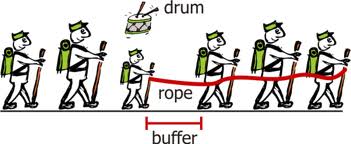
If you’ve had a chance to read the book “The Goal”, you are probably familiar with Drum, Buffer, Rope.  In the book, the main character observes some boy scouts on a hike.  One of the boy scouts was much slower than the other boy scouts so all of the kids were arriving at different times.  The kids at the front of the pack were getting to the rest stops way ahead of the other kids and the kids behind the slow scout (Herbie) were arriving late because they were behind Herbie.  He experimented with putting the slow kid at different places in the line but he couldn’t get all the kids to the rest stops at the same time.  When he applied this visual to his manufacturing operation, he found a bunch of parallels.  He had various activities happening in his factory but they were all operating at their own pace.  Some were faster, some were slower.  But “the goal” is to get materials that are complete and ready to ship in the most optimized manner.  So he applied the “drum, buffer, rope” concept to his operation.  Drum refers to the pace.  In lean, it would be known as Takt time.  There is an optimum pace that your factory needs to produce items and this optimum pace establishes the takt time or the “drum” in this example.  The rope is the way things are connected.  Each manufacturing operation is tied to the other.  If two activities are tied together, then you want the rope between them to be tight.  If it has slack, then the second activity is going too fast and if it is too tight then the first activity is going too fast.  The buffer is how big the rope is.  How much time between activity one and two?  How much buffer stock or inventory?

In our company, we are working with these ideas.  What is the Takt time in a curtain wall company?  How do we get the various departments and activities to work to that Takt time?  Can we get our vendors to work to our Takt time also?  How do we keep our extruder from shipping us 30-45 days of extrusions (too much buffer)?  How do we get our glass supplier to ship us the glass by day in lieu of large shipments by building?  Can we cut and fabricate just what we need tomorrow?  How would that effect our material optimizations?  Can we assemble and glaze the same number of units that the field will set in a day?  How do we get engineering to match that same pace?

This was one of the things we were considering when we chose our first machine.  In a manual process, people tend to optimize the cutting of like parts because it takes less time.  But this means that materials are not being produced in the same order that the assembly crew or the field installation crew wants them.  With The Planet and the Quadra machines, there is no need to cut all the same parts first.  The machine doesn’t care which parts it makes and does not mind making very different parts right after each other.  With the Emmegi software, we also have the option of sending an optimized list to the machines.  This means that we are not limited to the cutting optimization that the software would normally provide (saw man logic, longest to shortest, etc..) but we can cut our material in the order that it is required even if it means using a bit more metal.

Another advantage that we have now that we are working with our own software is that we have full control of these types of variables.  When we worked with Softtech’s V6 software, we were limited on what we could do with optimizations.  With lean, it is all about optimizing what the customer gets, not creating local optima.  Minimizing waste of metal and creating huge hunting and sorting wastes do not help your customer.

So decide what is creating the beat or takt time through your company.  Link your tasks together using the rope analogy (get them to run at the same pace) and decide how much buffer you need between activities to allow for problems and issues.  Create a smooth flow through your company.  The equipment you choose can greatly help with this.