Getting your data to the Machines

Getting your data to the Machines

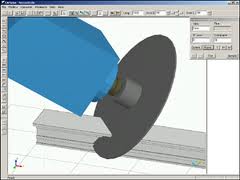
When we purchased our new machines, they came with the standard suite of Emmegi software: CamPlus, Job, Drill, and Shape.  The CamPlus software makes it easy to create your machinings.  The Job software is where you create the cutting information for each order you will send to the shop.  The Drill software is what converts the Job information into something the Machine can use.  Shape is for converting odd geometry into a machining.

The nice part of the Emmegi setup is that all the machines use the same software.  So if you start off with the planet, and then purchase the quadra, you can use the same software programs.  What they may not tell you is that the Job software has a text based interface.  It requires a USB driver that you plug into your computer and it allows you to import text data into Job.  When you go to purchase your machines, make sure you include this in the negotiations (ask about the USF or Unified Standard Format Driver).  You can get it for free if you know about it up front.  It will cost you about $6,000.00 if you need it later.

This driver is what you will use to connect your software like V6 to the Job software.  Essentially, you will create machinings in CamPlus, name them, possibly give them parameters then reference them in your output from your software.  Let’s say you have a vertical mullion.  It has a notch at the bottom and some clips that need holes drilled along the sides of the vertical at different heights.  You would create two LDT files in CamPlus.  One would be for the notch which has a fixed position (the bottom of the vertical) and one for the two holes that need to be drilled for the clips which would have one variable which is the relative position from the bottom of the vertical.  You would then create a text file from your software that would specify the part number you are fabricating, the length of the part, the bottom notch, and one entry with a dimension for each of the clips.  When you import this into Job, you will see the results for the part on your screen.  You can then modify it if you need to.  Your output can be for one or multiple parts at the same time.

The nice part about the text file input is that if you have a little coding ability, you can create these very easily from any software.  From V6, you will probably need to write some code to read the database and output the text file. But you could even do this from Excel if you wanted to.  Just create a spreadsheet where you can input all of the information and then write some code to roll through each line and then create the text file from it.

If you create 3d fabrication tickets, you can also pull these into CamPlus to create your machinings.  We find it easier to make individual files that can be reused but for complex parts or especially for compound miters on the Planet, pulling in the fabricated part and using that to make the programming easy is definitely the way to go.  On LAX we had parts with triple compound miters on both ends of the parts.  There was no way to even define the length of those parts most of the time.  By creating the part in Inventor or Autocad and then just importing it into the CamPlus software we were able to create very accurate fabricated parts with no difficulty.
 

Drum Buffer Rope – A view of pull and flow

Drum Buffer Rope – A view of pull and flow

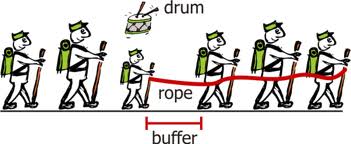
If you’ve had a chance to read the book “The Goal”, you are probably familiar with Drum, Buffer, Rope.  In the book, the main character observes some boy scouts on a hike.  One of the boy scouts was much slower than the other boy scouts so all of the kids were arriving at different times.  The kids at the front of the pack were getting to the rest stops way ahead of the other kids and the kids behind the slow scout (Herbie) were arriving late because they were behind Herbie.  He experimented with putting the slow kid at different places in the line but he couldn’t get all the kids to the rest stops at the same time.  When he applied this visual to his manufacturing operation, he found a bunch of parallels.  He had various activities happening in his factory but they were all operating at their own pace.  Some were faster, some were slower.  But “the goal” is to get materials that are complete and ready to ship in the most optimized manner.  So he applied the “drum, buffer, rope” concept to his operation.  Drum refers to the pace.  In lean, it would be known as Takt time.  There is an optimum pace that your factory needs to produce items and this optimum pace establishes the takt time or the “drum” in this example.  The rope is the way things are connected.  Each manufacturing operation is tied to the other.  If two activities are tied together, then you want the rope between them to be tight.  If it has slack, then the second activity is going too fast and if it is too tight then the first activity is going too fast.  The buffer is how big the rope is.  How much time between activity one and two?  How much buffer stock or inventory?

In our company, we are working with these ideas.  What is the Takt time in a curtain wall company?  How do we get the various departments and activities to work to that Takt time?  Can we get our vendors to work to our Takt time also?  How do we keep our extruder from shipping us 30-45 days of extrusions (too much buffer)?  How do we get our glass supplier to ship us the glass by day in lieu of large shipments by building?  Can we cut and fabricate just what we need tomorrow?  How would that effect our material optimizations?  Can we assemble and glaze the same number of units that the field will set in a day?  How do we get engineering to match that same pace?

This was one of the things we were considering when we chose our first machine.  In a manual process, people tend to optimize the cutting of like parts because it takes less time.  But this means that materials are not being produced in the same order that the assembly crew or the field installation crew wants them.  With The Planet and the Quadra machines, there is no need to cut all the same parts first.  The machine doesn’t care which parts it makes and does not mind making very different parts right after each other.  With the Emmegi software, we also have the option of sending an optimized list to the machines.  This means that we are not limited to the cutting optimization that the software would normally provide (saw man logic, longest to shortest, etc..) but we can cut our material in the order that it is required even if it means using a bit more metal.

Another advantage that we have now that we are working with our own software is that we have full control of these types of variables.  When we worked with Softtech’s V6 software, we were limited on what we could do with optimizations.  With lean, it is all about optimizing what the customer gets, not creating local optima.  Minimizing waste of metal and creating huge hunting and sorting wastes do not help your customer.

So decide what is creating the beat or takt time through your company.  Link your tasks together using the rope analogy (get them to run at the same pace) and decide how much buffer you need between activities to allow for problems and issues.  Create a smooth flow through your company.  The equipment you choose can greatly help with this.

New Quadra Arrives This Week

Emmegi Quadra L1

Emmegi Quadra L1


This is a picture of the new Quadra L1 that will be arriving next week from Italy.  This is actually the company’s 4th Quadra.  We have one in Fremont at Shop A, one in Arizona and one in Seattle.  We are putting this new quadra in our Shop B where we do most of our unitized curtain wall fabrication and assembly.

We have our first machine, The Planet, in Shop B also.  While the Quadra is an exceptional piece of equipment, the Planet is much more versatile.  The Quadra can not do compound miters and has some limits to what size of extrusions can be run through it.  It also has some length restrictions.

For the parts that work well with the Quadra, it is very efficient and easy to run.  I still think the Planet makes the best first investment.  We could never have fabricated the LAX project with anything else.  Once you have your feet wet, this machine is awesome.

Emmegi Training

We sent two people back to Italy to do some additional training on the Planet and the CamPLUS software. They are due to return next week. From the emails and discussions we had while they were there, I’m very excited about some of the things they have learned. Emmegi will be out to our plant the first week of November to help implement the new items. Many of them are just small problems that we have been dealing with over the last couple of years. The equipment has been great and the American support has also been very good but you just can’t replace learning the equipment from the guys who built it. I’ll post our progress on this item in the next couple of weeks.
I posted that I will be at AU in December. I should have clarified that AU is Autodesk University. This is a conference held annually (usually in Las Vegas) for all of the Autodesk software. Lots of BIM discussions and classes. Classes on Revit, Inventor, Autocad and Navisworks also.

Follow Up on the Emmegi Planet

We have now had the equipment up and running since July of 2007. The machine is working excellent with minimal issues. We typically run 2 to 3 shifts on the machine with about 1 hour of maintenance per day. We are on track with our ROI calculations and this purchase was definitely a success. Some of our lessons learned:It will take much longer than you think to get the machine up and running the way you want. I would allow 6 months for you to be able to run continuously with few problems. You will have to train people, they will make mistakes and they will cause issues that will require service. You will need to train service people and they will take a while to figure out how to keep the machine running or to debug issues. The machine itself takes a while to work out the kinks. Don’t figure on less. I have a few friends at other companies and for a 5 axis machine like this, they all agree.Software will be an issue. The CAM Plus software from Emmegi is excellent. We have found very few issues with this software. It can do almost anything you want and very minimal time for setup. Your parts libraries need to be in DXF files and saved in metric units. You can just write a script for this in Autocad and create a library on the fly. That being said, there is a learning curve in the office for people to understand what they can and can’t do with the machine. They will need to learn three pieces of software: CAM Plus, Job and Drill. They will need to understand the limits of the tools in the tool changers. They will need to learn which way to cut the metal with the flying blade. All of this takes time and people will make mistakes. We tried setting up the clamp options in the office but it was actually easier in the shop. Most things work with the default clamp locations but it is hard for the office to know when the clamps need to be closer to the machining. In the shop, you can hear it.

The Emmegi training wasn’t much help here. The people from Italy were able to get us up and running, but because of the language differences, it was mostly trial and error on our part.

You will also need other software besides the Emmegi stuff mentioned above. You will want to be able to import information into job and not have to enter it manually. We have created our own software to do our takeoffs and fabrication tickets. We then modified the program to be able to output the “unified standard format” files to the job software. This saves a ton of time and makes it possible to program as needed and not just high quantity repetitive parts. If you are purchasing a machine, make sure you get multiple copies of the software and the USB Key that enables the file imports. You will need one of these keys for every machine that needs to import files.

We have been reviewing the software from SoftTech and Orgadata. These are programs that allow you to create elevations inside the program and get BOM data and fabrication information. I’ll talk more about this in a future blog.

Service is another key aspect. We had many issues when we first started using the machine. Emmegi was very responsive. They flew people out from Italy and we got through all of our issues. I think that Elumatic has a pretty good service crew in The States, but I’m not sure about Tekna, Fom or Mubea. This is a critical component of the decision. I guess the best way to tell is to talk to other people who have the machines. I usually try to find people that have the machines to see what their experience has been. You can usually talk to the machine sales people to find out who their customers are, but you want to talk to the competing company to see who might be having trouble with a competitor’s machine. For instance, we were seriously considering a machine from Mubea, but I had heard from the Emmegi sales rep. that U.S. Aluminum was having issues with the machine. I contacted him and got some great feedback on the Mubea machine. He wasn’t as happy as Mubea made it sound, but he also wasn’t as unhappy as Emmegi made it sound. Most people I’ve talked to seem happy to help.

Installation of the Emmegi Planet

So our machine shipped on time.  The machine arrived in the port of Oakland and we had Bigge Crane Company transport it to our shop.  We removed it from the truck and moved it into our shop using one of the machines we would typically move our precast panels with.  We removed the case and everything appeard to be in great shape.  We had our electrical and networking connections already completed.  All we need now is the Emmegi personel to do the installation and training.

We had a few problems here.  The communication between Emmegi in the states, in Italy and our office could have been a bit better.  We had a hard time getting a straight story on when the installation would take place.  When the installer finally showed up at our office, he was very proficient in the hardware and software.  He spent the first week getting the machine installed and ready for use.  A lot of that time was actually the installation of the fence around the machine.  The machine itself had already been tested and run in Italy.

The biggest issue was the training.  Software training was minimal and there was no game plan for what they would train on.  What we needed was to try and program our first project for the machine while Emmegi was at our office.  We got a few test pieces programmed, but not a full order.  This allowed maybe one day of testing and then they were gone and we were on our own.  We then spent the next week getting the progams for our first order ready to run.  We hit several walls during this process.  Emmegi eventually sent out a second representative and we worked through our issues.  We were now ready to begin production.